



Vista completa
Articoli simili
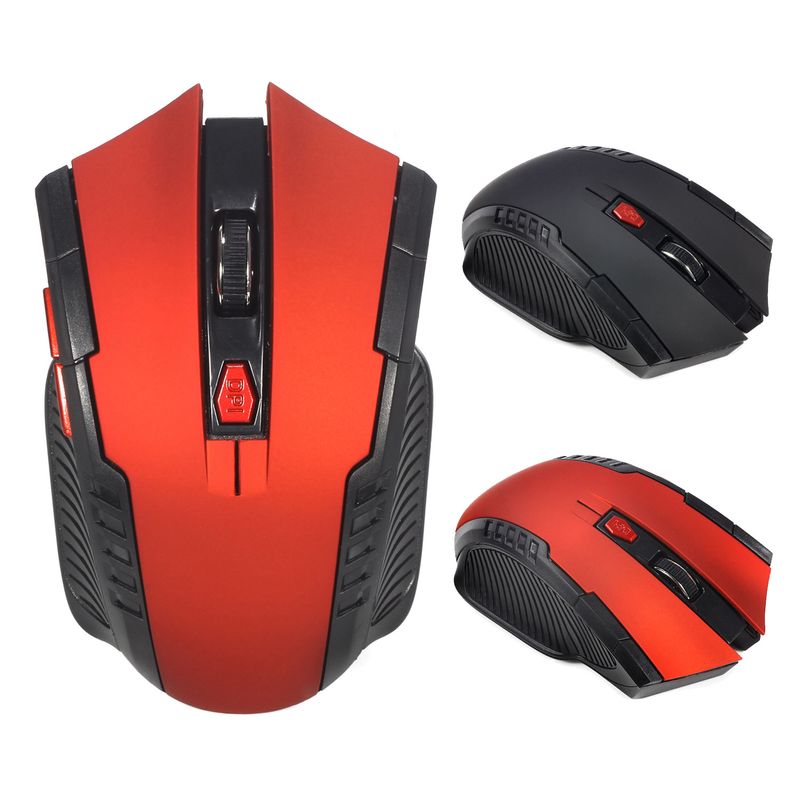
Mouse da ufficio wireless A882 a 6 tasti, 2,4 GHz, 1600 dpi, adatto per computer desktop e laptop, disponibile all'ingrosso
22,09€34,71€
Colore : Rosso


Quantità :

Rapporto
Includere la violazione del copyrightSpedizione standard gratuita. Guarda i detagli
Stimato tra Sat, Jun 27 e Wed, Jul 1
Puoi restituire il prodotto entro 30 giorni dal ricevimento. Guarda i detagli
Acquista con fiducia

Garanzia di rimborso
Ricevi l'articolo che hai ordinato o ti verrà restituito il denaro. Saperne di più
Informazioni su questo articolo
Tratto da CoreBox
Il venditore si assume ogni responsabilità per questa inserzione.Codice articolo: 33485228
Specifiche degli articoli
Caratteristiche
Luce mista, Opaco, Altro
Asse
Asse ottico, asse verde, asse del tè
Tastiera numerica
No sì
Connessione
Wireless
Misurare
<100mm, >130mm, 100mm-120mm
Descrizione dell'articolo da parte del venditore
Basic information:
Mini adapter plug and play
Wireless transmission, long sensing distance up to 10-15 meters
Taşınabilir ve hafif, taşıması ve saklaması çok kolay
Pover switch to save pover
6 keys are available, including a scroll wheel, page forward and page backward buttons, which are convenient for browsing the internet
Operating distance up to 10 meters
Product Specification:
IC model: MX8650
Return Rate: 250 Hz
Movement speed: 28 IPS
Refresh Rate: 3000 FPS
Acceleration: 10 G
Resolution: 800DPI, 1200DPI, 1600DPI adjustable
Color: Black, Red
Power Supply: 2 x AAA Batteries Not Included
Mouse type: Wireless Optical Mouse
Interface: USB
Size: 10.3 * 6.4 * 3.8cm
Net weight: 64g
Package size: 10.5 * 8.5 * 4.7cm
Gross weight: 94 g
Patskage includes:
1 x 2.4GHz Wireless Portable Optical Mouse Battery not included
1 x USB receiver
System Requirements:
Windows98/Me/2000/XP/Vista/Win7/Win8/win10/Win11 or Mac latest
Three-level power saving mode:
1: Three sets
cond into the first sleep light flash
hing continuously
2: After about 1 minute, it enters secondary sleep mode with intermittent flashing lights
3: After about 8 minutes, go to level 3 sleep, the light goes out
How to use:
1: First, open the back cover of the mouse, take out the USB receiver, and insert it into the USB port of the computer
2: Then install the AAA battery, turn on the power switch, and it can be used
3: Note: This mouse requires 2*AAA batteries. AAA batteries are not included


Video
Video per questo prodotto

 4.4 su 5 basato su 9,249 recensioni