



Vista completa
Articoli simili
Mouse wireless T200 Dual-Mode trasparente 2.4G/Bluetooth 5.0 ricaricabile, design magnetico, illuminazione RGB, disponibile.
64,11€106,09€
Colore : T200 Youth Pink Dual Mode

Quantità :

Rapporto
Includere la violazione del copyrightSpedizione standard gratuita. Guarda i detagli
Stimato tra Tue, Jun 16 e Sun, Jun 21
Puoi restituire il prodotto entro 30 giorni dal ricevimento. Guarda i detagli
Acquista con fiducia

Garanzia di rimborso
Ricevi l'articolo che hai ordinato o ti verrà restituito il denaro. Saperne di più
Informazioni su questo articolo
Tratto da Aura Bits
Il venditore si assume ogni responsabilità per questa inserzione.Codice articolo: 36795618
Specifiche degli articoli
Origine
DE
Caratteristiche
Opaco, Altro, RGB
Asse
Altro, Asse ottico, Asse verde
Tastiera numerica
Si No
Tipologia di prodotto
Mouse ricaricabile, mouse portatile, mouse muto
Connessione
Senza fili, Bluetooth, Altro
Misurare
100 mm-120 mm, 121 mm-130 mm, <100 mm
Certificazione
CE, UL, DOT
Descrizione dell'articolo da parte del venditore
Dimensions, weight, and packing quantity of T200:
Cord length: 30cm
Product weight: 72g
Product dimensions: 11.3x5.8x2.5cm
Packaging weight: 115g
Packaging dimensions: 12.3x7.5x3.5cm
Quantity per box: 60pcs
Packing dimensions: 37.5*26*28cm
Packing weight: 7.2kg
T200 dual-mode wireless mouse selling points:
Dual-channel 2.4G+Bluetooth connection, supports simultaneous connection to 2 devices, allowing for easy switching between them
Made of transparent PC material, with a clear and luminous appearance, showcasing a high-end texture, making you stand out in the office
3.Built-in 1600dpi three-speed adjustable sensor, precise operation, smooth scrolling, enhancing work efficiency
4.5 million times micro switch, mechanical keycap design, matte texture, fast rebound, and fast response
5.Multiple RGB lighting modes, full of personality, creating a cool desktop atmosphere, making your workspace more vibrant
charging, eliminating the hassle of tangled charging cables, making
more convenient use
7.Built-in 400mAh large-capacity lithium battery, strong e
Endurance, no need for frequent charging during long-term use, making your office life more convenient and worry-free
Product parameters:
Product model: T200 dual-mode wireless mouse
IC model: PixArt3065
Return rate: 125HZ
Connection method: 2.4+BT5.0
Lighting mode: RGB backlight 11 lighting modes
Mobile speed: 28IPS
Refresh rate: 3000FPS
Acceleration: 10G
Number of buttons: 4 keys
Key lifespan: 5 million times
Operation mode: photoelectric
Battery type: Built-in 400mAh rechargeable lithium battery
DPI: 800-1200-1600 dpi
Mouse material: fully transparent PC material
Roller material: silicone
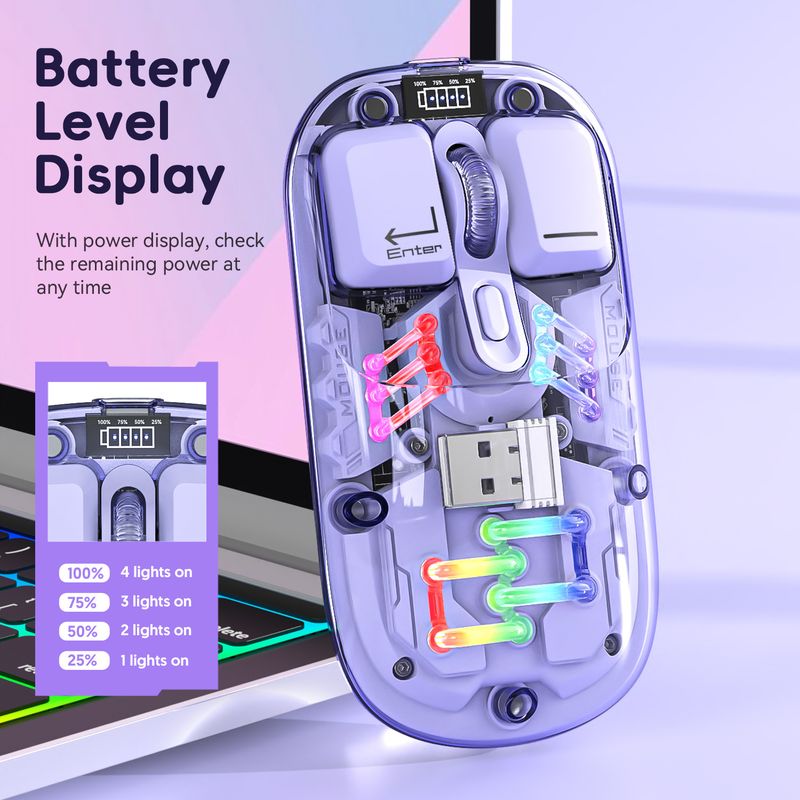
Battery display: 4-bar battery display key can be switched
Wireless distance: 10 meters
Charging interface: Type-C interface
Charging cable length: 30cm
Product size: 11.3x5.8x2.5cm
Product weight: 72g
Packaging size: 12.3x7.5x
3.5cm
Packaging weight: 115 g
Package includes :
1 x 2.4G+BT5
.0 Wireless Mouse
1 x USB Receiver
1 x Type-C Charging Cable 30CM
1 x Instruction manual
Operating systems:
Windows Vista
yes, Win7/8/10/11, ac OS X10.5 and later
Light operation:
Turn on the mouse switch, after successful connection, press the bottom button
of mouse Lighting mode switch key turn on the light mode
11 + 1 lighting modes can switch the light effectPress and hold
To turn off the light mode, press and hold to switch 11 light
effects
2.When there is no action on the mouse within 10 minutes, the mouse
will enter standby mode and all lights will be turned off
3.After entering sleep mode, press any key to re-enter connection and
The lights will automatically turn on
Installation and use steps: lower schematic:
12.4G wireless connection method:
Switch the button to 2.4G mode, plug in the USB receiver, the blue light is flashing, the mouse can be used. Power off when the switch is in the center position
position
2BT5.0 wireless connection method:
Switch t
Switch the BT mode button to BT, the blue light is flashing, the PC will automatically search for BT5.0 and confirm it, then it can be used; if you want to connect another PC, please switch the BT mode again and press the left button
Press the middle key for 3 seconds at the same time, the PC will search for the BT signal and choose to connect


Video
Video per questo prodotto

 4.4 su 5 basato su 9,249 recensioni